


Landing a big league as an emerging youth sports business is exciting. Saying yes is the easy part. The real work lives in the details: the rosters, the schedules, the lines of families, and the hundreds of images waiting for you to edit that night. Get those right, and growth feels like momentum, not chaos.
Back in October, Angelo McComis of AMAC Photo and Dani Mack of Dani Mack Photography came together to share exactly how they’ve built systems that let them take on more volume while keeping calm.
Scaling isn’t just booking more jobs
Adding more jobs on top of an already-packed schedule isn’t growth, it’s burnout.
Real scaling comes from building a foundation that handles higher volume with less friction, so you either make the same money while working less or work the same while making more. Don’t overlook these key steps of your prep:
What to gather (and plan) ahead of time
Getting the details up front is what keeps picture day calm. Most day-of scrambles trace back to information nobody asked for ahead of time, so start collecting early.
What to collect before the day:
- A CSV roster, or at least a headcount. A roster lets you set up private galleries. If you can’t get one, a group code with a QR opt-in is the next best option. No problem. Run picture day with public group galleries.
- Age groups and team count, so you can plan time realistically.
- Coach names and contact info for every team.
How to get ahead of questions:
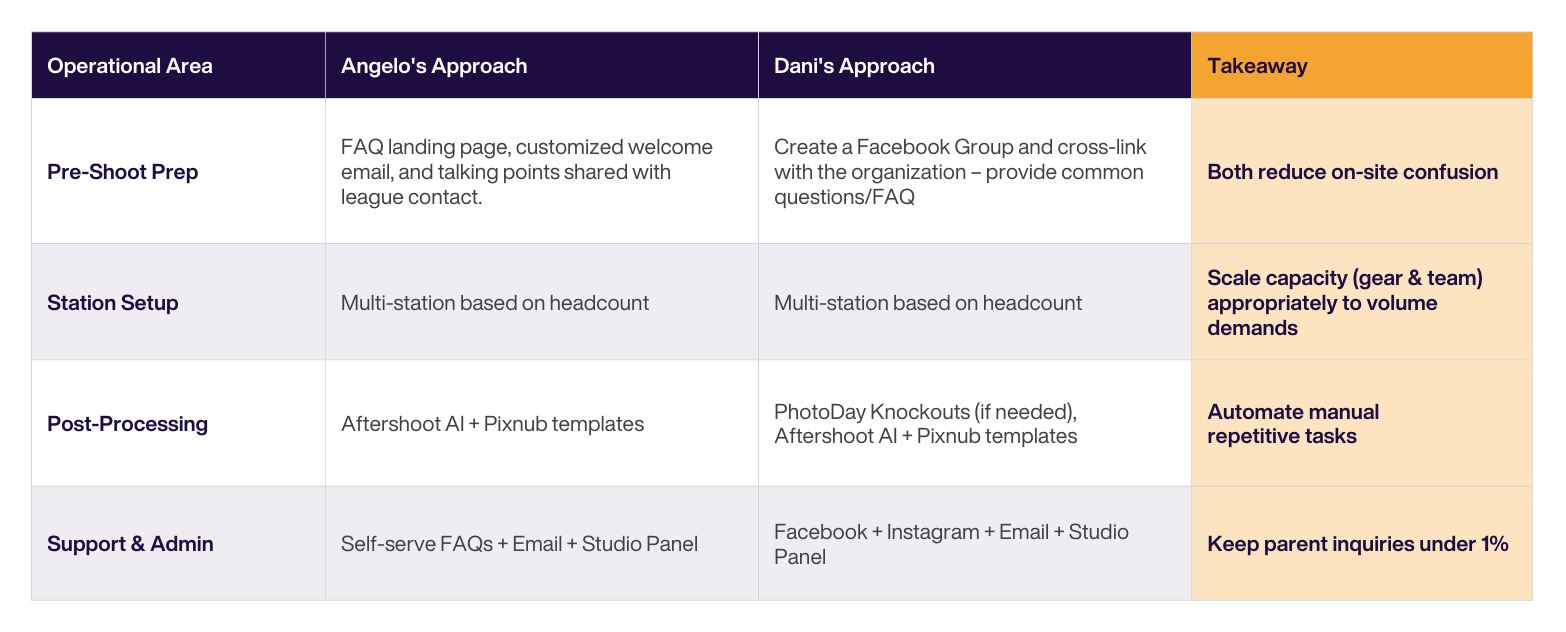
- Send a welcome email and an FAQ before picture day.
- For big leagues, Dani recommends creating a Facebook group and posting key reminders: an introduction, an AdvancePay reminder two weeks out, a venue walkthrough on the day, and a how-to-order post afterward.
How to build the schedule:
- Plan around the real pace of each sport. Cheer tends to take longer per athlete than baseball, and 5 to 15 minute blocks give you room to adjust.
- Let larger leagues build their own schedule if they prefer. Dani does this with her largest league (96 teams), but she always requires breaks.
- Add extra time for the youngest age groups. Older players move fast, while little ones often arrive with energy and the whole family in tow.
Run the day like a director
Before doors open, set up multiple camera stations based on your expected headcount, calibrate cameras, and have a run-of-show huddle with your assistant photographers and any other on-site helpers.
Plan to greet and prepare people first, building rapport and providing direction before stepping behind the camera. This works even better with more hands on deck.
Dani admits she overstaffs on purpose: “I am one of the people that will overstaff my picture days because I want the experience to be good for everyone.”
Her list includes posers, photographers, spotters watching for stray hair, a coordinator to move teams from station to station and keep the day on pace, plus a check-in assistant trained in Capture. She also opens her volume picture days to aspiring photographers as free, hands-on mentorship, so extra help can double as a learning opportunity for others. A few extra people cost far less than a backed-up line, a missed athlete, or a parent who leaves frustrated.
Outside of staff, it’s best to keep the crowd as small as possible and communicate any rules and expectations during your huddle and welcome rounds. Dani and Angelo’s best tips are to keep parents out of the photo area (coaches excepted) and adding a line about limiting guests in an FAQ download sent out prior to picture day.
While sibling photos may take extra time, Dani and Angelo both recommend saying “yes” to them, as they’re an easy extra sale.
Upload that night, then let the tools do the first pass
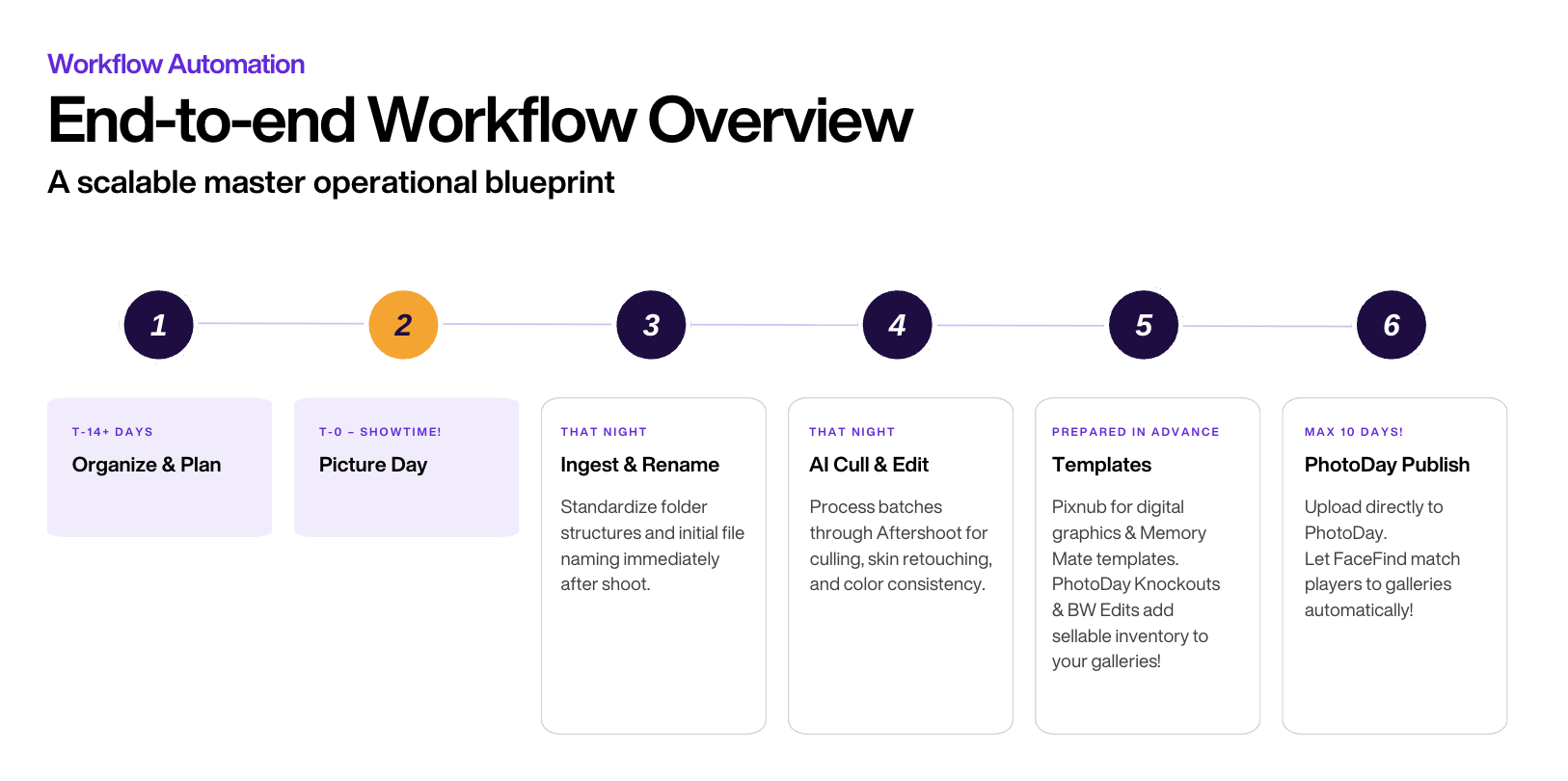
Pull the cards and organize your photos the night of the event while everything is fresh. You will never regret pushing through a lull in motivation and taking the time to set future-you up for for an easier time. Using a job_team_XX folder structure and file naming convention can help you find images fast.
From there, culling tools like Aftershoot can save you hours. They handle the tedious first pass: flagging blurry frames and closed eyes, grouping duplicates, and applying light fixes for glasses glare, blemishes, and color consistency. Treat that pass as a head start, not a finished product. Always review the selections and make your own edits before anything goes to families.
Get even better results by capturing two or more frames per pose. That way, the software has more options to choose from and can work with the best ones. Do this for every athlete.
Turn one pose into a full gallery
Here’s where prepared templates pay off. Angelo uses Pixnub, building a set of pre-made designs for each school or league in their team colors. Pixnub automatically drops each photo into each design so you can avoid placing images one at a time. Save time by starting from ready-made templates by creators like 3rd Creative and Josh Hannah.
Add in close-up and wider crop options, plus the black and white option from PhotoDay, three poses and a team photo turns into 20 images instead of 4.
Suddenly, Download All looks a lot more appealing, without a single extra frame captured, and the manual work is gone. “I can’t remember the last time I did that, quite honestly,” Angelo said.
Use Capture to clean up composites
Composites get messy when you can’t tell which face belongs to which team, especially across multi-day events. After uploading your first JPEGs, export the composite CSV from PhotoDay. This lists every subject’s name, team, coach, and the photos they appear in. With a little spreadsheet filtering you’re able to:
- Pull each team’s files by team and coach
- Remove images that appear under more than one subject, like buddy photos
- Flag each athlete’s first pose as the composite image (by always capturing poses in the same order)
After Picture Day: Setting Realistic Goals
Once the photos are in the gallery, the goal is to let the system take the lead, letting you passively monitor and move on to your next job.
Let fulfillment run on its own
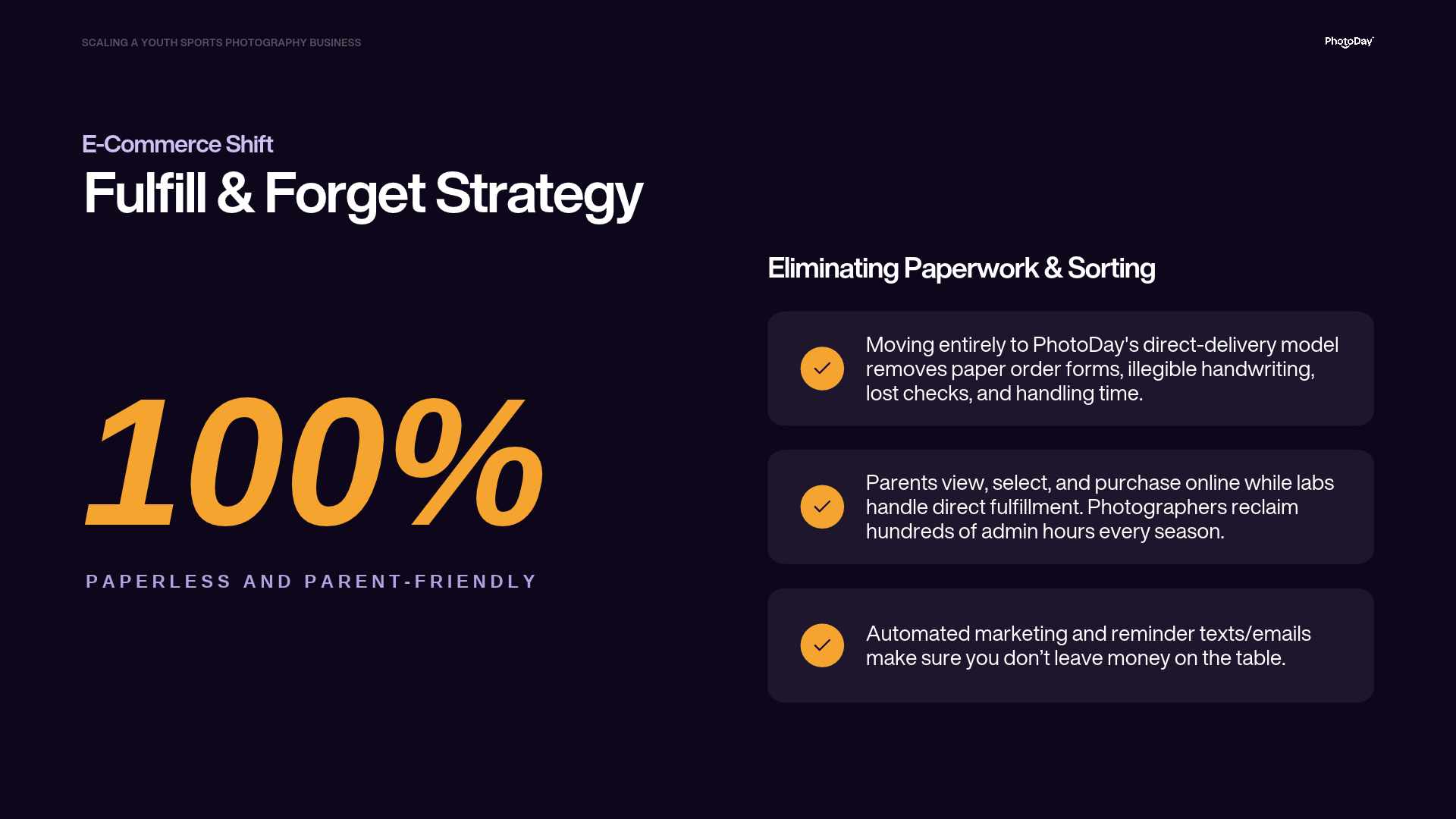
With online ordering, parents order from their gallery, prints arrive in about a week, and digital downloads are ready the moment they check out. Meanwhile, automated reminder texts and emails keep sales coming without you chasing anyone. Tracking numbers go straight to parents, PhotoDay’s automated help answers most checkout questions, and NPS surveys flag issues worth following up on.
If something does go wrong, like a bent package or a lab packing error, just use the reprint button in the Studio Panel.
Know what good sales actually look like
Don’t be discouraged if you’re not reaching 90 to 100% conversion. When thinking about past jobs, Angelo recalled a recent cheer job that reached 80%, but considered that a big win, explaining how most of his jobs land in the 50 to 70% range. Final sales numbers depend on the sport, the families, pricing, and offers. Tracking orders across seasons shows you what’s working, which families haven’t ordered yet, and which offers are most likely to win them over.
Grow at a pace you can handle
Growth is exciting, and it’s worth going after with confidence. Just make sure every new league or school you take on is one you can photograph, edit, and deliver at the quality your families expect. A great picture day earns the next referral, but a rushed one can cost you the account.
Start by mapping out the full process, from the league saying yes to the final print arriving, and look for the spots where parents or board members get stuck. Add help right at those sticking points, whether that’s another front desk helper or a tool that saves you editing time.
Dani emphasizes, “The experience is everything.”
If things start to slip and you can’t keep up or bring on more help yet, it’s okay to scale back, take on fewer jobs for a season, iron out what isn’t working, and grow again once your process feels solid. Then on picture day, make sure everyone knows who you are, so each great experience turns into your next referral.
The Short Version
Scaling a youth sports photography business is less about adding jobs and more about removing friction from the ones you already have. Collect rosters early, get questions answered before picture day, staff strategically, and lean on automation to take on some of the more time-consuming admin work like culling, fulfillment, and follow-up.
“There isn’t just one right way to scale. The key is discovering systems that align with how you work best and consistently protect quality.” — Dani Mack (Dani Mack Photography)
Your next big “yes” doesn’t have to feel like a leap. It can feel like the next step.
Want help setting up CSV rosters, Capture, or composite exports before your next league? Request a demo to connect with the PhotoDay team.