How Angelo McComis Stays Stress-Free On Picture Day

Written by
PhotoDay
August 1, 2026

How Angelo McComis Stays Stress-Free On Picture Day

Every volume photographer has a picture day story: the setup that got started an hour too late, the teams that showed up all at once, the gear that quit halfway through. The problem usually isn’t the job itself—day-of stress often stems from learning important information too late. 

In PhotoDay’s recent webinar, Angelo McComis breaks down the planning systems that help uncover key details ahead of time and eliminate surprises on picture day.  

Why Does Picture Day Feel So Stressful?

The day before the webinar, Angelo arrived early to a location for a fairly complex setup, only to learn the facility wouldn’t be free until 1 o’clock. A setup that typically takes over an hour was compressed into 30 minutes. Then, in the middle of the session, construction at the school knocked out the power. Angelo weighed his options: extend the session once power returned, keep going on battery power, or cut the scope.

Most picture day stress can be traced back to four friction points: time pressure, information gaps, staffing and capacity, and day-of disruptions like facility issues, weather, and no-shows. 

The common thread is surprise. 

As Angelo says, “stress isn’t caused by the event; it’s caused by discovering important information for the first time on picture day.”

The fix is to answer the big questions before you load the car, centering on four main points: subjects, time, capacity, and risks.
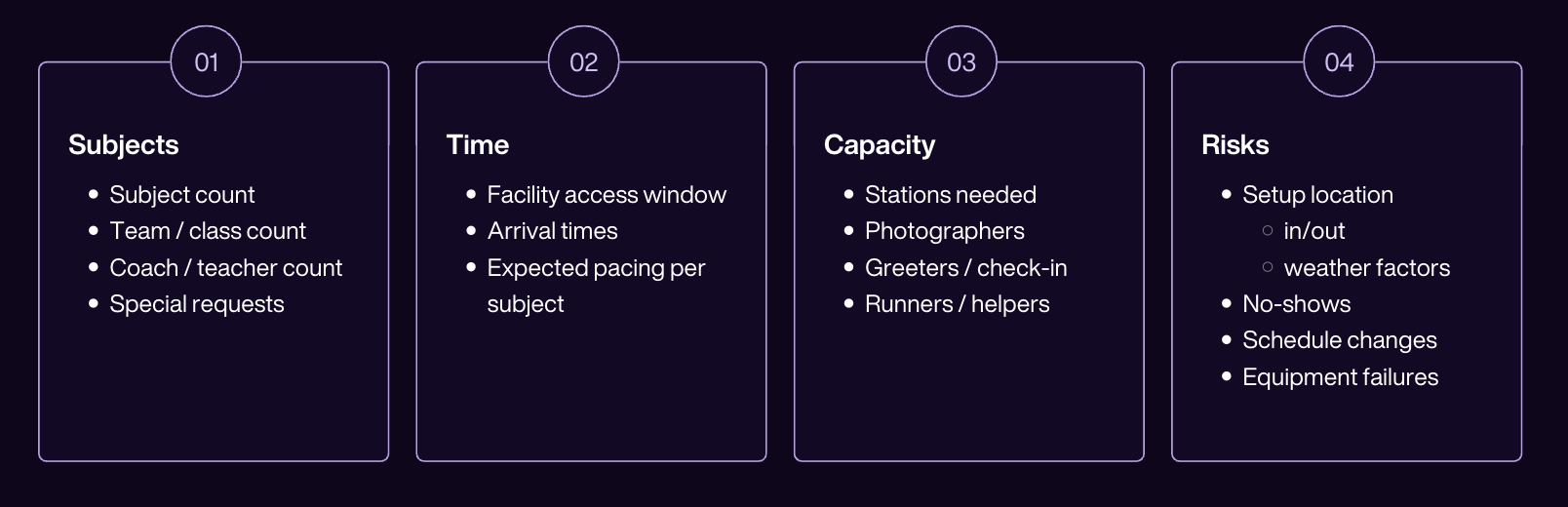
Table outlining information to gather before picture day related to subjects, time, capacity and risks

How Many Subjects Are You Really Photographing?

Subject count drives everything else. Working with 20 subjects is very different from 30 once you factor in a one-hour window, multiple stations, and extra time for siblings, coaches, and team photos.

It’s best to collect a roster or class list for Private Galleries and use a Registration Form for Group and Public Galleries. If the numbers are fuzzy, look at historical participation patterns and team sizes. A rough count beats no count.

How Many Images Are You Taking?

Variations turn every pose into more to choose from. On a recent football and cheer job, Angelo offered 3 or 4 poses per athlete, each with about 5 backgrounds and treatments, including a plain background for statuettes, a banner template, and a black and white option from PhotoDay’s free converter. That’s 20 to 25 images per gallery before team photos.

How Much Time Do You Actually Have?

When can you arrive, and when do you need to be packed up and out? Are there breaks between subjects or teams, or does one group roll straight into the next? Pin those answers down with your organization before you plan anything else, because that decides how much of that time you actually get to photograph.

Once the high-level timing is confirmed, draft a day-of itinerary that answers the questions: where do I need to be, and when? Then share it. Coaches can pass on key details and timing to their players, managers to their staff, and schools can use a block schedule so every class knows where to be.

Can Your Setup Keep Up?

Capacity comes down to a simple formula: 

required throughput equals expected subjects divided by allocated time

Fitting in 60 subjects in 60 minutes means getting through at least one person per minute, and that’s before you add team or class photos, coach and teacher headshots, intros, moving between setups, and lighting changes.

Now picture 120 athletes on 10 teams with two hours on the clock. At about one minute per athlete and 5 minutes per team photo, that’s 170 minutes of work in a 120-minute window. Your options are a second station and photographer, or asking for three hours instead of two.

“Give yourself the allotted time that you need. You can’t make yourself go faster.” - Reagan Clifton (PhotoDay)

Not sure of your pace? Check timestamps from similar past jobs and look for the bottlenecks, like a single person checking in 300 people or slow lighting changes. Then staff for it: a greeter, a check-in helper, and a runner who can fetch gear or bring the next group in early.

What’s Your Backup Plan?

Think of this as a pre-mortem: what could go wrong, and what will you do about it? Most problems are predictable and preventable.

  • If you’re outdoors, have an indoor or covered alternative, like the space under the bleachers.
  • Keep staggered arrivals tight enough to pull the next group in early when only 25 of 30 show up.
  • Decide in advance how you’ll handle no-shows and last-minute schedule changes. (Be ready for the coach that asks to flip the schedule.)

‍

Then there’s gear. “If you’ve got one camera and you lose one camera, you have zero cameras,” Angelo says. It’s simple math—and the reason to follow an N+1 rule for everything critical. Use dual card slots so every image has two copies from the moment the shutter clicks, and carry a spare camera, lens, strobe, and trigger.

Connect Every Image to a Buyer

“I can sit there and can take photos all day, but if I don’t have a way to get them to my customers, I don’t make any money.” - Angelo McComis (AMAC Photo)

Get your images to the people buying them. These four tools close that gap:

‍

Private Galleries
Each subject gets their own Gallery tied to your roster or class list, so you’re connected to families by email from the start. Up to 3 emails can be added per subject, giving multi-household families proper buyer access.

‍

The PhotoDay Capture App
The Capture app syncs with your Private Gallery subject data. On picture day, you check each subject in and snap a reference photo, which PhotoDay uses to match uploaded images to the right gallery. No more writing down names and jersey numbers; plus, any day-of helpers can log in on their own devices for seamless teamwork.

‍

Registration Form
When a roster won’t arrive in time, the Registration Form fills the gap. Families scan a job-specific QR code, enter their details, and snap a quick selfie, which creates subject data right in your job. Share the code before picture day or post it on-site. With everyone registering from their own phone, check-in moves faster, too.

‍

AdvancePay
AdvancePay lets families purchase a credit before picture day, then use it toward any products once their gallery goes live. Since the credit isn’t tied to a package, families can wait to see every option before deciding what to order, and with part of the order already paid for, families often end up adding the extra prints or products they didn’t plan to before. For studios, it confirms participation ahead of time, and you start the job with payment already in hand.

Tell Everyone the Plan

Before families arrive, take 2 or 3 minutes to walk your greeter or check-in helper through the questions parents are most likely to ask:

  • How do I order photos?
  • When will my photos be ready?
  • How do I use my access code?
  • Where will my order ship?
  • What poses and backgrounds can I choose from?

‍

A short FAQ page makes those answers easy to share. Angelo writes this in a Google Doc, publishes it to the web, and turns the link into a QR code that helpers and parents can scan on the spot. When you can’t reach parents directly, like with booster club sports, send the same FAQ through the job’s built-in marketing emails along with each family’s access code.

Helping Families Who Are New to the Process

If you don’t have a check-in helper, gather everyone for a quick huddle and have anyone who hasn’t registered scan the Registration Form QR code right at the start. Each job’s gallery access tab includes ready-made QR codes for registration and text opt-in that you can put on a banner by the door.

For those used to paper forms, keep the explanation simple: You see before you buy. 

Families get a notification when photos are live, pick their favorite poses, customize their products, and check out. The cart walks them through each step, so your main job is reminding them picture day is coming and letting them know when photos are ready.

family gathered around phone looking at photos from picture day

The best studios don’t eliminate problems—they eliminate surprises.

Know your subject count, build a timeline you’ve shared, do the throughput math, and pack a backup for everything critical. Then make sure every image connects to a buyer and every parent knows what happens next. Do that, and picture day stops feeling like firefighting and starts feeling like a plan you’re running.

Want a second set of eyes on your next job setup? Reach out through the chat bubble, and the team will help you get everything in place.

‍

BLOG & ARTICLES

Related Posts

Trailblazers
September 14, 2026

How SplitRock Photography Grew 21X in Six Years

Trailblazers
August 1, 2026

How Angelo McComis Stays Stress-Free On Picture Day

Trailblazers
August 13, 2021

TRAILBLAZER: ZEKE MORENO

Try PhotoDay today with no strings attached.

No cost to get started.

How Angelo McComis Stays Stress-Free On Picture Day

Written by
PhotoDay
August 1, 2026

How Angelo McComis Stays Stress-Free On Picture Day

Every volume photographer has a picture day story: the setup that got started an hour too late, the teams that showed up all at once, the gear that quit halfway through. The problem usually isn’t the job itself—day-of stress often stems from learning important information too late. 

In PhotoDay’s recent webinar, Angelo McComis breaks down the planning systems that help uncover key details ahead of time and eliminate surprises on picture day.  

Why Does Picture Day Feel So Stressful?

The day before the webinar, Angelo arrived early to a location for a fairly complex setup, only to learn the facility wouldn’t be free until 1 o’clock. A setup that typically takes over an hour was compressed into 30 minutes. Then, in the middle of the session, construction at the school knocked out the power. Angelo weighed his options: extend the session once power returned, keep going on battery power, or cut the scope.

Most picture day stress can be traced back to four friction points: time pressure, information gaps, staffing and capacity, and day-of disruptions like facility issues, weather, and no-shows. 

The common thread is surprise. 

As Angelo says, “stress isn’t caused by the event; it’s caused by discovering important information for the first time on picture day.”

The fix is to answer the big questions before you load the car, centering on four main points: subjects, time, capacity, and risks.

Table outlining information to gather before picture day related to subjects, time, capacity and risks

How Many Subjects Are You Really Photographing?

Subject count drives everything else. Working with 20 subjects is very different from 30 once you factor in a one-hour window, multiple stations, and extra time for siblings, coaches, and team photos.

It’s best to collect a roster or class list for Private Galleries and use a Registration Form for Group and Public Galleries. If the numbers are fuzzy, look at historical participation patterns and team sizes. A rough count beats no count.

How Many Images Are You Taking?

Variations turn every pose into more to choose from. On a recent football and cheer job, Angelo offered 3 or 4 poses per athlete, each with about 5 backgrounds and treatments, including a plain background for statuettes, a banner template, and a black and white option from PhotoDay’s free converter. That’s 20 to 25 images per gallery before team photos.

How Much Time Do You Actually Have?

When can you arrive, and when do you need to be packed up and out? Are there breaks between subjects or teams, or does one group roll straight into the next? Pin those answers down with your organization before you plan anything else, because that decides how much of that time you actually get to photograph.

Once the high-level timing is confirmed, draft a day-of itinerary that answers the questions: where do I need to be, and when? Then share it. Coaches can pass on key details and timing to their players, managers to their staff, and schools can use a block schedule so every class knows where to be.

Can Your Setup Keep Up?

Capacity comes down to a simple formula: 

required throughput equals expected subjects divided by allocated time

Fitting in 60 subjects in 60 minutes means getting through at least one person per minute, and that’s before you add team or class photos, coach and teacher headshots, intros, moving between setups, and lighting changes.

Now picture 120 athletes on 10 teams with two hours on the clock. At about one minute per athlete and 5 minutes per team photo, that’s 170 minutes of work in a 120-minute window. Your options are a second station and photographer, or asking for three hours instead of two.

“Give yourself the allotted time that you need. You can’t make yourself go faster.” - Reagan Clifton (PhotoDay)

Not sure of your pace? Check timestamps from similar past jobs and look for the bottlenecks, like a single person checking in 300 people or slow lighting changes. Then staff for it: a greeter, a check-in helper, and a runner who can fetch gear or bring the next group in early.

What’s Your Backup Plan?

Think of this as a pre-mortem: what could go wrong, and what will you do about it? Most problems are predictable and preventable.

  • If you’re outdoors, have an indoor or covered alternative, like the space under the bleachers.
  • Keep staggered arrivals tight enough to pull the next group in early when only 25 of 30 show up.
  • Decide in advance how you’ll handle no-shows and last-minute schedule changes. (Be ready for the coach that asks to flip the schedule.)

‍

Then there’s gear. “If you’ve got one camera and you lose one camera, you have zero cameras,” Angelo says. It’s simple math—and the reason to follow an N+1 rule for everything critical. Use dual card slots so every image has two copies from the moment the shutter clicks, and carry a spare camera, lens, strobe, and trigger.

Connect Every Image to a Buyer

“I can sit there and can take photos all day, but if I don’t have a way to get them to my customers, I don’t make any money.” - Angelo McComis (AMAC Photo)

Get your images to the people buying them. These four tools close that gap:

‍

Private Galleries
Each subject gets their own Gallery tied to your roster or class list, so you’re connected to families by email from the start. Up to 3 emails can be added per subject, giving multi-household families proper buyer access.

‍

The PhotoDay Capture App
The Capture app syncs with your Private Gallery subject data. On picture day, you check each subject in and snap a reference photo, which PhotoDay uses to match uploaded images to the right gallery. No more writing down names and jersey numbers; plus, any day-of helpers can log in on their own devices for seamless teamwork.

‍

Registration Form
When a roster won’t arrive in time, the Registration Form fills the gap. Families scan a job-specific QR code, enter their details, and snap a quick selfie, which creates subject data right in your job. Share the code before picture day or post it on-site. With everyone registering from their own phone, check-in moves faster, too.

‍

AdvancePay
AdvancePay lets families purchase a credit before picture day, then use it toward any products once their gallery goes live. Since the credit isn’t tied to a package, families can wait to see every option before deciding what to order, and with part of the order already paid for, families often end up adding the extra prints or products they didn’t plan to before. For studios, it confirms participation ahead of time, and you start the job with payment already in hand.

Tell Everyone the Plan

Before families arrive, take 2 or 3 minutes to walk your greeter or check-in helper through the questions parents are most likely to ask:

  • How do I order photos?
  • When will my photos be ready?
  • How do I use my access code?
  • Where will my order ship?
  • What poses and backgrounds can I choose from?

‍

A short FAQ page makes those answers easy to share. Angelo writes this in a Google Doc, publishes it to the web, and turns the link into a QR code that helpers and parents can scan on the spot. When you can’t reach parents directly, like with booster club sports, send the same FAQ through the job’s built-in marketing emails along with each family’s access code.

Helping Families Who Are New to the Process

If you don’t have a check-in helper, gather everyone for a quick huddle and have anyone who hasn’t registered scan the Registration Form QR code right at the start. Each job’s gallery access tab includes ready-made QR codes for registration and text opt-in that you can put on a banner by the door.

For those used to paper forms, keep the explanation simple: You see before you buy. 

Families get a notification when photos are live, pick their favorite poses, customize their products, and check out. The cart walks them through each step, so your main job is reminding them picture day is coming and letting them know when photos are ready.

family gathered around phone looking at photos from picture day

The best studios don’t eliminate problems—they eliminate surprises.

Know your subject count, build a timeline you’ve shared, do the throughput math, and pack a backup for everything critical. Then make sure every image connects to a buyer and every parent knows what happens next. Do that, and picture day stops feeling like firefighting and starts feeling like a plan you’re running.

Want a second set of eyes on your next job setup? Reach out through the chat bubble, and the team will help you get everything in place.

‍

Share
Try PhotoDay today with no strings attached.

No cost to get started.

Sign up to get the party started!