Boost Holiday Sales Without Photographing More Jobs

Written by
PhotoDay
November 13, 2026

Fall picture days are winding down, your galleries are published, and holiday plans are already filling up your personal calendar. You want to keep making money over the holidays but the last thing you need is more jobs to photograph. 

Luckily, with the right mix of reminders, product updates, and gallery refreshes, you can create more orders from the work you’ve already done. So, how exactly can this be done? In a recent webinar, we turned to photographers and PhotoDay experts Austin Carter and Justin Baker for their best tips and go-to holiday sales strategies.

Here’s the good news: an unfinished order isn’t a lost sale. More often, a parent starts browsing on their phone, gets pulled away, and just needs a reason and timely reminder to come back.

Give Families a Reason to Come Back to the Gallery

A gallery that looks the same as it did in October gives families no reason to return. A few fresh, intentional additions change that. 

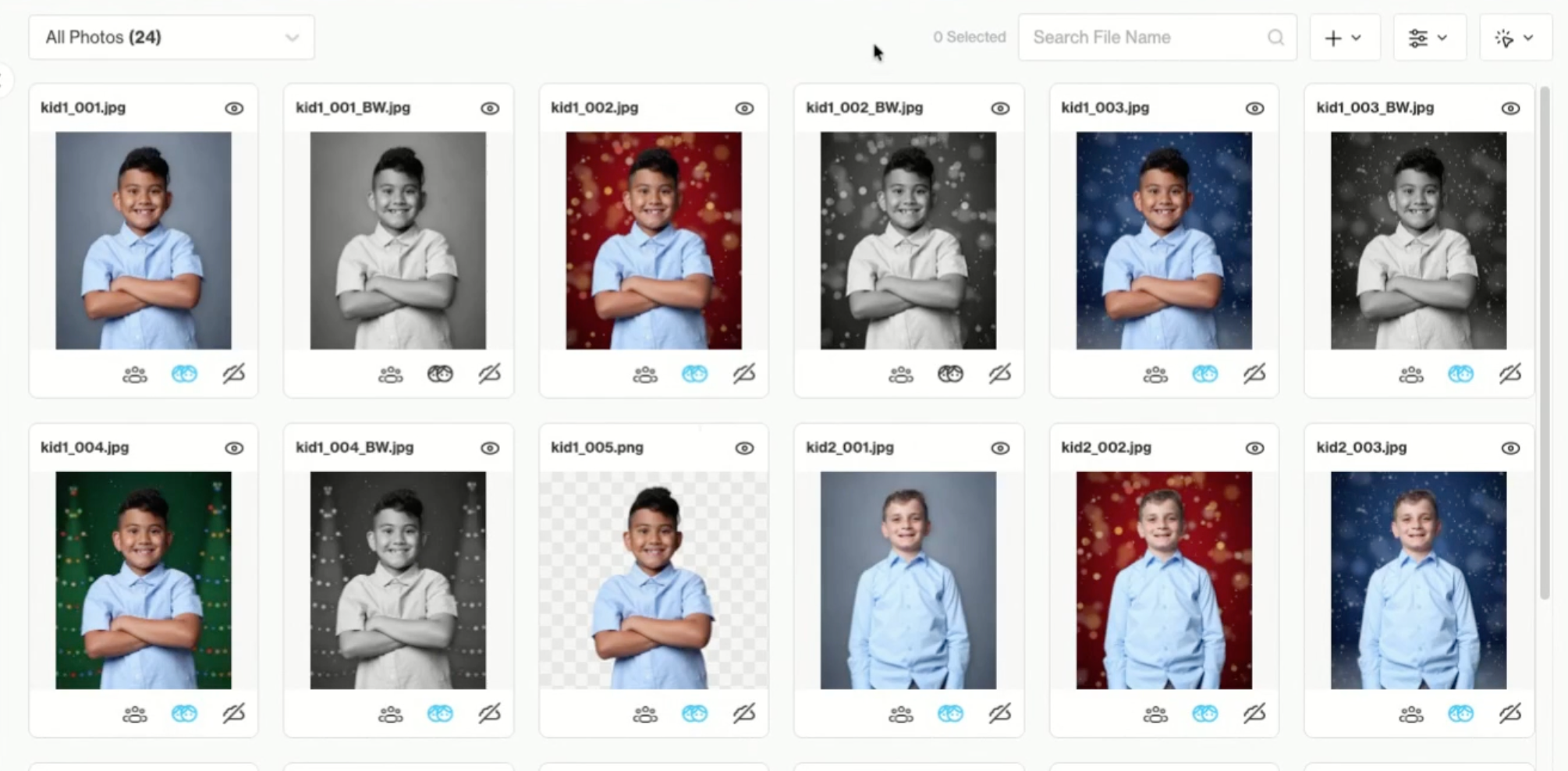
Holiday backgrounds are the easiest place to start. If you’re using PhotoDay’s Backgrounds feature with extracted PNGs, attach a holiday collection so families can pick their own. You can also knock out your photos, add the backgrounds yourself, and upload final JPEGs to the gallery. Then double your gallery’s inventory with PhotoDay’s free black and white processing service.
‍

Remember to keep it simple. A few well-chosen options help families decide quickly, while too many can be overwhelming.

A Little Nudge Goes a Long Way

Last December, studios using Holiday Delivery texts had some of the biggest days of their season. On the day the “deadline tonight” text went out, sales came in about 3 times higher than a normal day. That text had no discount code, just a date. Studios that ran a Cyber Monday deal saw about 1.4 times a normal day’s sales.

Why does it work so well? Between school concerts, sports tournaments, travel, and family plans, the season flies by, and order deadlines can slip past before parents realize it. A clear, well-timed reminder crosses one gift off their list and makes sure their photos arrive before the holidays. It may seem like a small extra step, but families appreciate it. You earn more orders, and families remember the studio that made it easy.

Families who already ordered are worth another look too. Offering ornaments, holiday cards, or gift-friendly products now gives them a reason to return: something for the tree, something for the grandparents, something to mail out with the holiday cards.

Let PhotoDay Send the Reminders for You

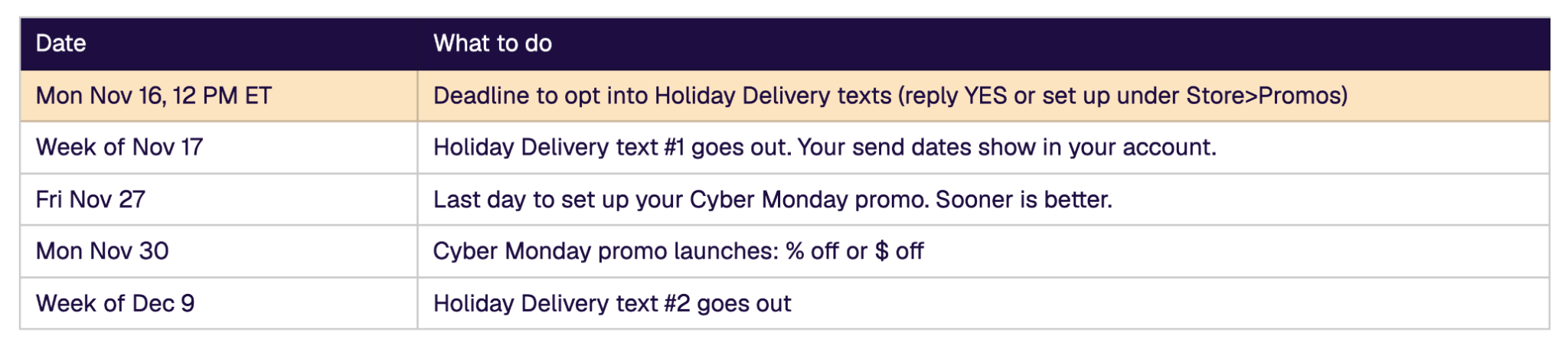
The good news is, you don’t have to write, schedule, or time these texts yourself. Opt-in to PhotoDay’s Holiday Delivery promo by 12 PM ET, November 16, and customers will receive auto-scheduled reminders at the moments that matter most. Here’s how the season’s texts work together:

  • Holiday Delivery text 1: a friendly heads-up to order in time for the holidays.
  • Cyber Monday: an optional one-day promo with a percent-off or dollar-off code.
  • Holiday Delivery text 2: the “deadline tonight” reminder that drives the biggest day.
Want your customers to get holiday reminders? Reply YES to the chat bubble in your Studio Panel or set it up yourself:

  1. In the PhotoDay Studio Panel, go to Store > Promos and click Request Custom Promo. 
  2. In the promo type dropdown, you’ll find two holiday options: 
    1. Holiday Delivery: sends two reminder texts, no offer needed.
    2. Cyber Monday: links to an offer of your choice. 

Both come with preset delivery dates and times, so your texts reach families when they need a nudge. 

  1. Pick your audience (everyone, or only those who haven’t ordered)
  2. Select your jobs
  3. Preview each message
  4. Scroll up and click Create to save. 

For a full walkthrough, see our support article: How to Request a Custom SMS

Build a Holiday Price Sheet

Rework a few packages so they include gift items: an ornament for the tree, or a magnet grandma can keep on her fridge year after year. Keep your most popular print sizes, then add a handful of specialty products, even ones that aren’t your bestsellers during the regular season. Test them this year and drop whatever doesn’t move.

Need item ideas? Ornaments and holiday cards are always strong picks, then canvas prints and acrylic blocks make keepsakes that can stay on display all year long. Offerings vary by lab, so check your preferred lab’s product list in your price sheet to see what’s available. Make sure to switch from Prints to Specialty Items (or Display Items) to find them in the product search.
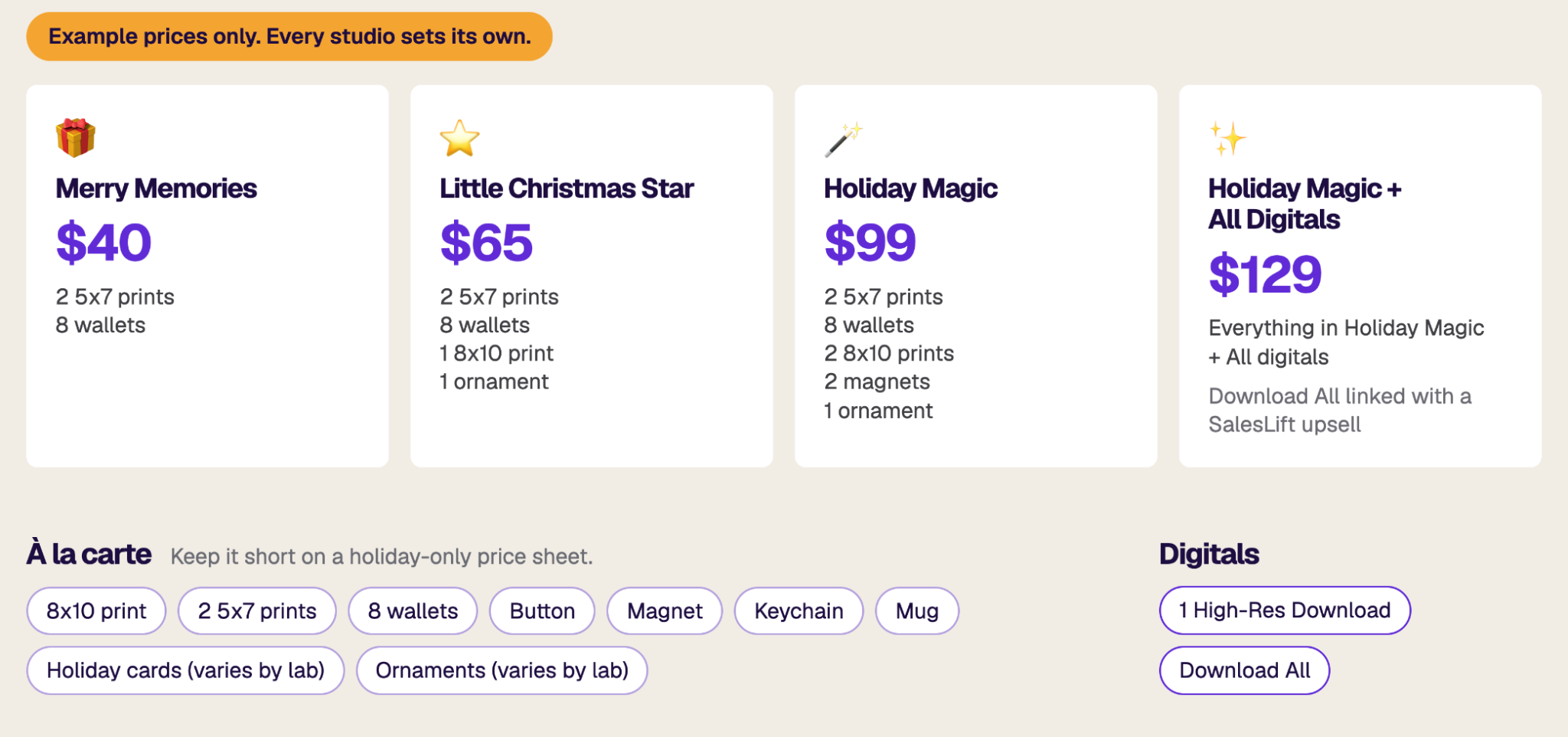
You don’t need to build new price sheets from scratch. Instead, edit the price sheet already attached to your jobs, add a couple of ornaments and one holiday package at the top, and the changes will go live on every attached gallery the moment you save. 

Want a separate holiday sheet instead? Use bulk actions to assign the new price sheet to a group of jobs, then switch them back after the holidays.

Don’t sleep on digitals: Download All sales add up

Justin and Austin both agree that if there’s one product to push this season, it's digitals, and the Download All option is a win for everyone. You get a sale with no lab costs attached. Families then have an option with no shipping deadline, plus they get all their photos instantly and the freedom to share them, edit them, or print them wherever they like. 

Last season, holiday orders that included Download All came in at nearly double the average of orders without it, in what Austin and Justin called “the biggest sales boost they’ve seen.”

“Don't sleep on digital downloads. Download All is probably the biggest sales boost we've seen. Period.” - Justin Baker (PhotoDay)

Holiday Minis and Events

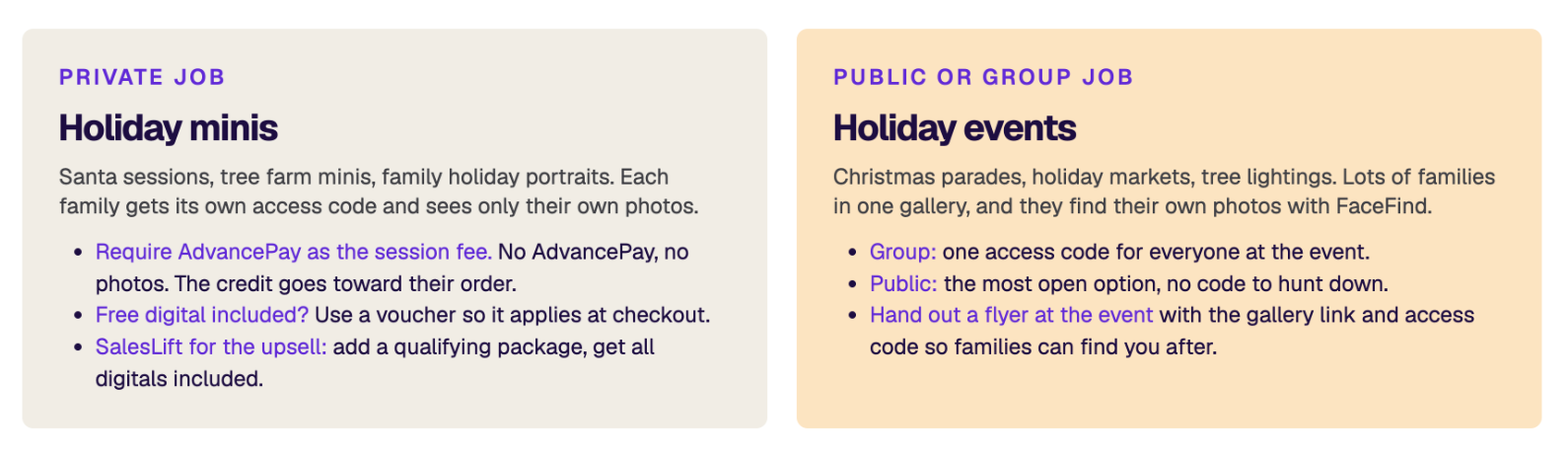
If you’re photographing holiday sessions this year, start with one question: do you have a list of who you’re photographing? Then reference the table below to determine which type of job would work best for the job.
Your Holiday To-Dos (Here’s your list, now check it twice)

Your holiday revenue doesn’t have to depend on booking more sessions. By giving families something new to buy and reminders to act, you can create more orders with the photos already in your galleries. 

  • Opt into the Holiday Delivery promo before 12 PM ET, November 16
  • Add holiday backgrounds                
  • Think about reopening expired jobs
  • Check for local holiday events
  • Check your lab partner’s holiday products
  • Set up and opt into the Cyber Monday promo
  • Consider adding a few new holiday packages

‍

Ready to put these strategies to work? Watch the webinar replay

New to PhotoDay? Request a demo or create a free account to get started.

BLOG & ARTICLES

Related Posts

No items found.

Try PhotoDay today with no strings attached.

No cost to get started.

Boost Holiday Sales Without Photographing More Jobs

Written by
PhotoDay
November 13, 2026

Fall picture days are winding down, your galleries are published, and holiday plans are already filling up your personal calendar. You want to keep making money over the holidays but the last thing you need is more jobs to photograph. 

Luckily, with the right mix of reminders, product updates, and gallery refreshes, you can create more orders from the work you’ve already done. So, how exactly can this be done? In a recent webinar, we turned to photographers and PhotoDay experts Austin Carter and Justin Baker for their best tips and go-to holiday sales strategies.

Here’s the good news: an unfinished order isn’t a lost sale. More often, a parent starts browsing on their phone, gets pulled away, and just needs a reason and timely reminder to come back.

Give Families a Reason to Come Back to the Gallery

A gallery that looks the same as it did in October gives families no reason to return. A few fresh, intentional additions change that. 

Holiday backgrounds are the easiest place to start. If you’re using PhotoDay’s Backgrounds feature with extracted PNGs, attach a holiday collection so families can pick their own. You can also knock out your photos, add the backgrounds yourself, and upload final JPEGs to the gallery. Then double your gallery’s inventory with PhotoDay’s free black and white processing service.

‍

Remember to keep it simple. A few well-chosen options help families decide quickly, while too many can be overwhelming.

A Little Nudge Goes a Long Way

Last December, studios using Holiday Delivery texts had some of the biggest days of their season. On the day the “deadline tonight” text went out, sales came in about 3 times higher than a normal day. That text had no discount code, just a date. Studios that ran a Cyber Monday deal saw about 1.4 times a normal day’s sales.

Why does it work so well? Between school concerts, sports tournaments, travel, and family plans, the season flies by, and order deadlines can slip past before parents realize it. A clear, well-timed reminder crosses one gift off their list and makes sure their photos arrive before the holidays. It may seem like a small extra step, but families appreciate it. You earn more orders, and families remember the studio that made it easy.

Families who already ordered are worth another look too. Offering ornaments, holiday cards, or gift-friendly products now gives them a reason to return: something for the tree, something for the grandparents, something to mail out with the holiday cards.

Let PhotoDay Send the Reminders for You

The good news is, you don’t have to write, schedule, or time these texts yourself. Opt-in to PhotoDay’s Holiday Delivery promo by 12 PM ET, November 16, and customers will receive auto-scheduled reminders at the moments that matter most. Here’s how the season’s texts work together:

  • Holiday Delivery text 1: a friendly heads-up to order in time for the holidays.
  • Cyber Monday: an optional one-day promo with a percent-off or dollar-off code.
  • Holiday Delivery text 2: the “deadline tonight” reminder that drives the biggest day.

Want your customers to get holiday reminders? Reply YES to the chat bubble in your Studio Panel or set it up yourself:

  1. In the PhotoDay Studio Panel, go to Store > Promos and click Request Custom Promo. 
  2. In the promo type dropdown, you’ll find two holiday options: 
    1. Holiday Delivery: sends two reminder texts, no offer needed.
    2. Cyber Monday: links to an offer of your choice. 

Both come with preset delivery dates and times, so your texts reach families when they need a nudge. 

  1. Pick your audience (everyone, or only those who haven’t ordered)
  2. Select your jobs
  3. Preview each message
  4. Scroll up and click Create to save. 

For a full walkthrough, see our support article: How to Request a Custom SMS

Build a Holiday Price Sheet

Rework a few packages so they include gift items: an ornament for the tree, or a magnet grandma can keep on her fridge year after year. Keep your most popular print sizes, then add a handful of specialty products, even ones that aren’t your bestsellers during the regular season. Test them this year and drop whatever doesn’t move.

Need item ideas? Ornaments and holiday cards are always strong picks, then canvas prints and acrylic blocks make keepsakes that can stay on display all year long. Offerings vary by lab, so check your preferred lab’s product list in your price sheet to see what’s available. Make sure to switch from Prints to Specialty Items (or Display Items) to find them in the product search.

You don’t need to build new price sheets from scratch. Instead, edit the price sheet already attached to your jobs, add a couple of ornaments and one holiday package at the top, and the changes will go live on every attached gallery the moment you save. 

Want a separate holiday sheet instead? Use bulk actions to assign the new price sheet to a group of jobs, then switch them back after the holidays.

Don’t sleep on digitals: Download All sales add up

Justin and Austin both agree that if there’s one product to push this season, it's digitals, and the Download All option is a win for everyone. You get a sale with no lab costs attached. Families then have an option with no shipping deadline, plus they get all their photos instantly and the freedom to share them, edit them, or print them wherever they like. 

Last season, holiday orders that included Download All came in at nearly double the average of orders without it, in what Austin and Justin called “the biggest sales boost they’ve seen.”

“Don't sleep on digital downloads. Download All is probably the biggest sales boost we've seen. Period.” - Justin Baker (PhotoDay)

Holiday Minis and Events

If you’re photographing holiday sessions this year, start with one question: do you have a list of who you’re photographing? Then reference the table below to determine which type of job would work best for the job.

Your Holiday To-Dos (Here’s your list, now check it twice)

Your holiday revenue doesn’t have to depend on booking more sessions. By giving families something new to buy and reminders to act, you can create more orders with the photos already in your galleries. 

  • Opt into the Holiday Delivery promo before 12 PM ET, November 16
  • Add holiday backgrounds                
  • Think about reopening expired jobs
  • Check for local holiday events
  • Check your lab partner’s holiday products
  • Set up and opt into the Cyber Monday promo
  • Consider adding a few new holiday packages

‍

Ready to put these strategies to work? Watch the webinar replay

New to PhotoDay? Request a demo or create a free account to get started.

Share
Try PhotoDay today with no strings attached.

No cost to get started.

Sign up to get the party started!